WhisperReporter Ascent's Repair Request Editor
Product Description
The Repair Request Editor is a companion app for WhisperReporter Ascent's Summary Report creation of a Repair Request List. It allows Real Estate Agents in conjunction with a buyer to select various deficiencies provided by an inspector and highlight significant items they wish to convey to the seller, such as to repair or replace these items. The relator can then create a PDF report of just those items that the seller needs to address.
Usage
The inspector will create and send you a WRRL (Whisper Repair Request List) file. You can either double click the email attachment or save the attachment to your local disk and then double click that file. This should launch the RepairRequestEditor and open the WRRL file.
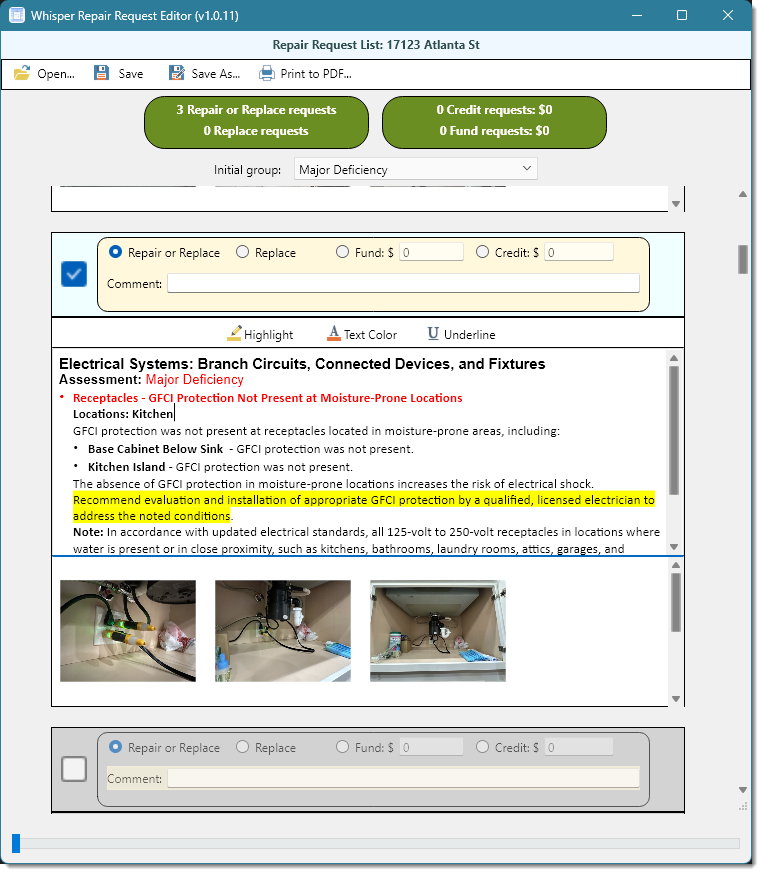
Once opened, you will be presented with various deficiencies provided by the inspector. They may also be grouped by qualifiers defined by the inspector, such as Major, Minor, etc. You can order them by using the Initial Group dropdown as needed.
By default, none of the deficiencies are selected to be included in the PDF report for the buyer, and will be grayed out. To select an item simply toggle the checkbox in the top left of the item. From there you can then select what to do, add a comment and even highlight specific text in the deficiency narrative provided by the inspector.
Once you have browsed the list, you can generate the report as a PDF for the seller which will only include the items you selected. If you want to be able to come back to the list at a later time without having to redo your edits, you will need to save your changes. If you had opened the file by just double clicking the email attachment, you will have to select "Save as" instead of just "Save" because it would have been write protected.
Windows Installation
If you currently have the Repair Request Editor installed, the app will show a "Get Update" menu item at the top if there is a new version available. Clicking that menu item will download and install the update automatically. However, if you didn't select to install the Repair Request Editor during the install of WhisperReporter Ascent, you will need to download the Windows version of the RepairRequestEditor using the button below which will download a setup program that you will need to run. This setup program will install or update an existing version. Once installed you can delete the setup program.
MacOS Installation
From your Mac, you will need to download the MacOS version of the RepairRequestEditor using the button below which will download a zip file that the Mac will automatically extract the RepairRequestEditor.app file into the Downloads folder. Open the downloads folder and drag the RepairRequestEditor.app file into your Applications folder.