|
<< Click to Display Table of Contents >> RapidRemarks |
  
|
|
<< Click to Display Table of Contents >> RapidRemarks |
|
RapidRemarks is where all the reusable comments in WhisperReporter Ascent are stored. These preferences will help manage some of the ways you interact with the RapidRemarks.
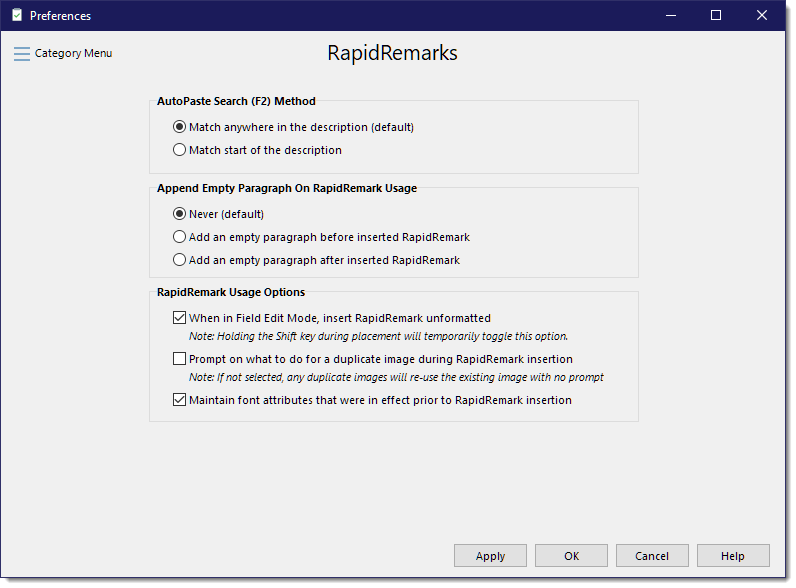
AutoPaste Search (F2) Method (case insensitive)
This method allows you to find RapidRemarks based on their description using one of the following search methods.
•All the search words match somewhere in the description (default)
This will use each search word to find RapidRemarks having a description that contains all of the search words in any order.
•Any one of the search words matches first word of the description
This will use each search word to find RapidRemarks having a description that starts with at least one of the search words.
It is recommended that you choose the first option so that you will have the opportunity to match on as many words as possible.
Optionally include Empty Paragraph(s) On RapidRemark Usage
With these options you can add blank lines before and/or after an inserted RapidRemark.
RapidRemark Usage Options
•When in Field Edit Mode, Insert RapidRemark unformatted
All RapidRemarks are formatted with line spacing, font sizing and at times with picklists and tags, among other things. It is not typical that RapidRemarks be inserted unformatted unless you are inserting them into a form (Field Edit Mode style topic). To prevent a Form's layout from being undesirably corrupted, you would want to have this option selected if you use form entry style topics. Note: you can insert unformatted RapidRemarks on a per RapidRemark basis by holding down the Shift key when inserting a RapidRemark whether in a form entry topic or a normal narrative topic.
•Prompt on what to do for a duplicate image during RapidRemark insertion
In most cases, images that have been added to RapidRemarks will not be subsequently edited once inserted into a report. When an image is added to a report from a RapidRemark that already exists, you can avoid the prompt for overwriting, cloning or re-using the same image, by not selecting this option; in which case the image will simply re-use the existing image instead of prompting for what to do about the duplicate image.
•Maintain font attributes that were in effect prior to RapidRemark insertion
After insertion of a RapidRemark, you can have it continue with the formatting within the RapidRemark or the way it was prior to inserting the RapidRemark. The default is to maintain the attributes as they were (this option being selected).